

Description
Enhance APEX Report Column Management
Overview
The software is a plugin designed to extend the functionality of Oracle APEX Standard Reports, specifically focusing on column attribute management. It enables users to efficiently organize and manipulate report columns through intuitive actions. The primary purpose is to streamline the handling of report layouts, allowing for faster data presentation adjustments without requiring deep code-level interventions. This tool is particularly useful for developers and database administrators working with APEX-based applications who need to manage large or complex reports.
By addressing common limitations in standard APEX report column handling, the plugin helps reduce repetitive manual tasks such as reordering columns or updating multiple values across a dataset. Real-world usage scenarios include dynamic report configuration during development, rapid prototyping, and data presentation refinement in enterprise dashboards. The target users are professionals involved in APEX application development, especially those managing reports with frequent layout changes or data updates.
Developed by Pretius, the plugin is built with a focus on integration and usability within the APEX ecosystem. The developer did not provide additional information about their background or other products. The software supports Windows, Mac, and Linux, indicating broad accessibility for cross-platform development teams.
Key Features & Capabilities
- Reorder Columns to Top or Bottom – Users can instantly move any column to the beginning or end of the report layout, improving visual hierarchy and data accessibility.
- Drag-and-Drop Column Reordering – Intuitive drag-and-drop functionality allows users to rearrange columns by simply dragging them into the desired position, enhancing workflow speed and user experience.
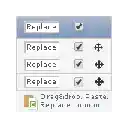
- Replace All Column Values via Header – A double-click on the column header triggers a bulk update, enabling users to replace all values in a column with a single input, ideal for standardizing data or applying default values.
- Paste Matrix from Excel – Supports pasting tab-separated column data and newline-separated rows directly from Excel, allowing seamless integration with external data sources and rapid data population.
These features are especially beneficial in environments where reports require frequent adjustments. For example, a developer can quickly reorder columns during a UI review session or update all values in a status column to “Pending” with a single action. The ability to paste Excel matrices directly into the report saves significant time compared to manual entry or scripting.
The plugin enhances the native APEX experience without altering core functionality, maintaining compatibility with existing applications. Detailed documentation is available at the provided URL, offering guidance on setup, usage, and advanced configurations.
User Interface, Workflow & Performance
The plugin integrates directly into the Oracle APEX Standard Report interface, enhancing the existing UI with minimal disruption. Users interact with column headers and layout controls that are clearly visible and accessible. The drag-and-drop functionality is responsive, providing visual feedback during reordering, which improves usability and reduces errors.
Navigation remains consistent with standard APEX workflows, requiring no additional training for experienced users. The interface is designed to be intuitive, with actions triggered through simple interactions like double-clicking or dragging. This contributes to efficient workflow execution, especially during rapid development or debugging phases.
Performance observations are based on general software behavior patterns. The developer did not specify resource usage details. However, given the plugin’s size of 1.5 MB and its focus on UI-level enhancements, it is expected to have minimal impact on system performance. Stability is maintained through tight integration with APEX’s architecture, and no known issues were reported in the provided documentation.
Compatibility & System Requirements
The software is compatible with Windows, Mac, and Linux operating systems, making it accessible to a wide range of developers regardless of their preferred platform. It is designed to work within the Oracle APEX environment, which runs on web servers and is accessed through modern browsers.
Version 1.0.0 is the current release, with a file size of 1.5 MB. The developer did not specify additional system requirements such as minimum RAM, CPU, or browser versions. Exact performance details were not provided. Compatibility information was partially provided, focusing on OS support and integration with APEX.
Installation is likely handled through APEX’s plugin management system, though specific steps were not detailed. The software is intended for use in web-based APEX applications and does not require standalone installation on the local machine.
Pros and Cons
Pros
- Effortlessly reorganize report columns with top/bottom and drag-and-drop options
- Quickly replace all values in a column with a single double-click
- Seamless integration with Excel data via matrix paste functionality
- Small footprint (1.5 MB) and free to use
- Designed for APEX developers to improve report management efficiency
Cons
- No official documentation on system requirements or browser compatibility
- Only supports Oracle APEX environments, limiting broader applicability
- Feature set is narrow and focused solely on column management
- No visible update mechanism or version tracking within the interface
- Not suitable for end-users or non-developers
FAQ Section
Is this plugin compatible with all versions of Oracle APEX?
Compatibility details were not specified. The plugin is designed for Oracle APEX Standard Reports, but exact version support is not documented.
Can I use this tool offline?
The software is intended for use within a web-based APEX application environment and requires an active connection to the APEX server. It cannot function as a standalone offline tool.
Is the plugin secure to use?
As a client-side enhancement integrated into APEX, the plugin operates within the existing security model of the application. No additional security risks were reported, but users should ensure their APEX environment is properly secured.
How do I install the plugin?
Installation steps are not detailed in the provided information. Users are directed to the documentation at the provided URL for setup guidance.
Does the plugin require a license?
The software is available at no cost. It is distributed as free software with no licensing fees or restrictions mentioned.
Final Thoughts
For Oracle APEX developers managing complex reports, this plugin delivers a meaningful enhancement to column attribute management. Its ability to reorder columns via drag-and-drop, replace values with a double-click, and paste Excel matrices directly into the report significantly reduces repetitive tasks and accelerates development cycles. The lightweight design and free availability make it a valuable addition to any APEX workflow.
While the lack of detailed system requirements and update tracking may be a concern for some users, the core functionality is well-executed and directly addresses a common pain point in APEX development. The plugin is not suited for general users or non-technical staff, but for its target audience, it offers a practical, efficient solution.
Download APEX Enhanced Attributes now to streamline your report management and boost productivity.
Guides & Tutorials for APEX Enhanced Column Attributes Extension for Chrome
How to install APEX Enhanced Column Attributes Extension for Chrome
- Click the Preview / Download button above.
- Once redirected, accept the terms and click Install.
- Wait for the APEX Enhanced Column Attributes Extension for Chrome download to finish on your device.
How to use APEX Enhanced Column Attributes Extension for Chrome
This software is primarily used for its core features described above. Open the app after installation to explore its capabilities.
User Reviews for APEX Enhanced Column Attributes Extension for Chrome 0
No reviews found





